

A content calendar that actually turns into published work
Plan the right SEO pieces, schedule them as Tasks, and follow the agent work from one calendar so every brand publishes with more consistency.
See what should ship next, and why it matters
CopyJump turns your calendar into a clear SEO workflow. Your team can quickly see which pieces are planned, which keyword or page they support, and what needs attention next.
Each scheduled Task keeps the brief, brand, voice, target URL, publish date, and agent activity together. That means you can plan the right content, follow the CopyJump agent, and keep publishing consistent across one site, a team, or multiple brands.
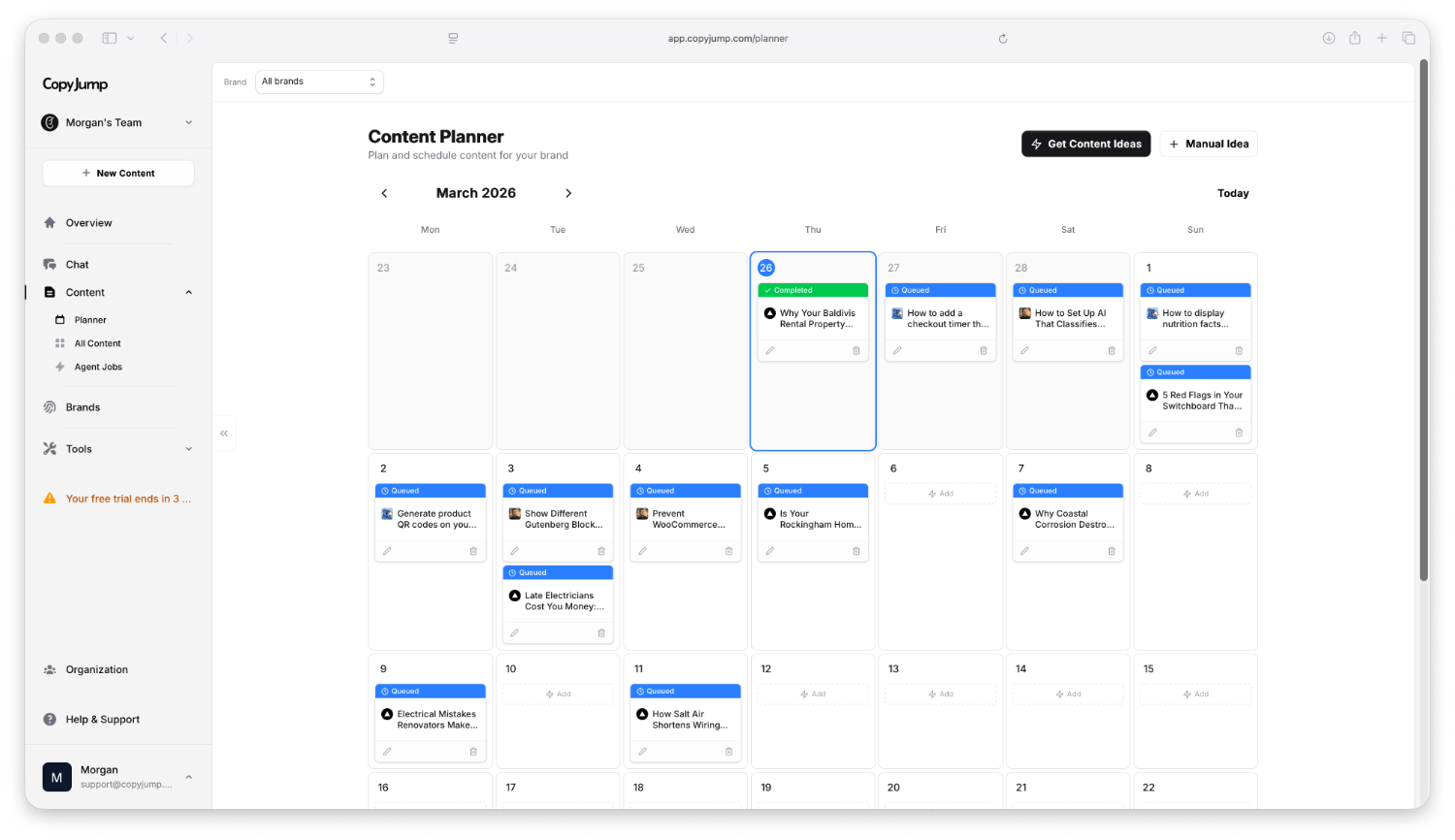
How teams use the calendar
The calendar is the scheduled view of your production pipeline. Ideas can stay unscheduled while they are still rough, then move onto the calendar when the task is ready for production.
Capture the move
Save a suggestion, campaign idea, page refresh, keyword, or existing brief before it gets lost.
Schedule the task
Give the Task a brand, voice, instructions, content type, and date when it is ready.
Track production
Run the agent, follow the work, review the draft, and keep the publishing plan accurate.
What the calendar does for consistency
Consistent publishing is not just about posting more often. It is about publishing the right pieces, on a realistic schedule, with enough visibility that the plan survives handoffs, delays, and team changes.
Choose work worth publishing
Start from brand context, keywords, Search Console signals, existing pages, and content gaps so the calendar is not just filled with dates. It is filled with the right work.
- Uses brand and audience context
- Connects ideas to SEO opportunity
- Keeps weak topics out of the plan
Turn plans into Tasks
Every scheduled item is a Task with the brief, brand, voice, content type, and date attached. The calendar stays useful because the work behind each slot is visible.
- Plan across multiple brands
- Edit dates and instructions
- Keep briefs out of scattered docs
Follow the agent work
Run the CopyJump agent or SEO agent from the task and follow what it is doing, even when you are not writing the draft yourself.
- Run scheduled tasks on demand
- Keep the brief attached to production
- Move from plan to review-ready draft
Frequently Asked Questions
Can I import my existing content calendar?▼
Not yet, but you can quickly add planned content as Tasks. That gives each item a brief, brand, voice, and schedule instead of leaving it as a row in another tool.
How do Tasks work with the calendar?▼
Tasks are the work items behind the calendar. You can create them from suggestions, strategy chats, manual ideas, or existing briefs, then schedule the ones that are ready.
Can I plan content for multiple brands?▼
Yes. Each brand can have its own scheduled Tasks, and teams can use the calendar to keep work visible across multiple brands without mixing up briefs or voice.
Can I see what the agent is doing?▼
Yes. The calendar connects to Tasks, so you can run the CopyJump agent or SEO agent from the task and follow the production work instead of wondering where the draft stands.
Can I collaborate with my team?▼
Yes. Team members can view the planned work, adjust dates, refine instructions, and keep the calendar accurate as priorities change.
Manage your SEO workflow from one calendar.
Turn keywords, briefs, refreshes, and agent production into scheduled Tasks, so your team always knows what needs to rank next and where the work stands.
Plan across brands, keep briefs attached, and follow CopyJump agent work without another spreadsheet.