

Lesson 7: Topic Clusters for Authority
Building semantic depth Google trusts. How to structure your content so it compounds instead of competes with itself.

Random posts on random topics don't build authority. You end up with a collection of content that doesn't connect, and Google can't figure out what you're actually about.
Topic clusters solve this. One central topic, multiple related posts, all connected. This structure helps Google understand your expertise and helps readers find more of your content. It's how small sites compete with big ones.
What a Topic Cluster Actually Is
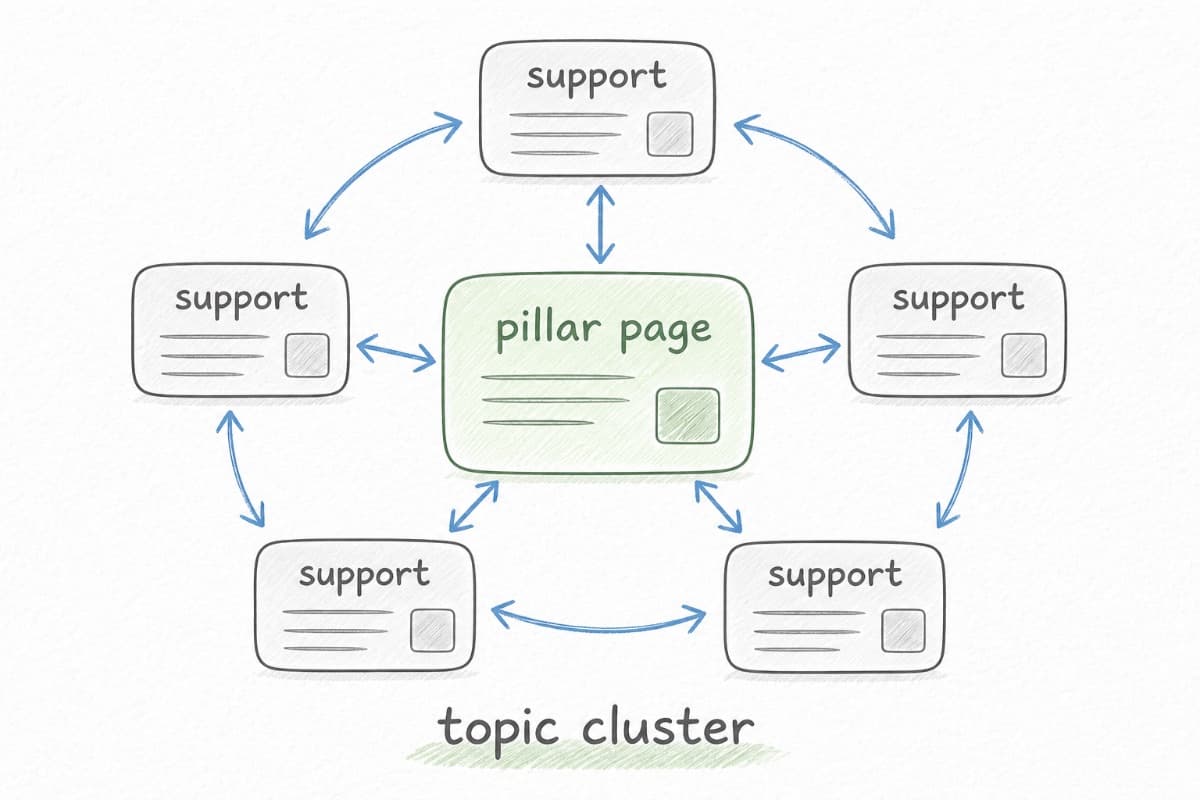
A topic cluster has three components.
The pillar page is a comprehensive guide to your main topic. It's broad, covering the topic thoroughly at an overview level. It's the hub that everything else connects to.
Supporting posts go deep on specific aspects of the topic. Each one targets a more focused keyword and provides detail the pillar can't. They link back to the pillar and to each other.
Internal links tie it together. The pillar links to all supporting posts. Supporting posts link back to the pillar. Related supporting posts link to each other. This creates a web of connected content that signals depth. Lesson 12 covers the mechanics of internal linking in detail.
Here's a concrete example. Your pillar is "Content Marketing for B2B SaaS." Supporting posts might be "How to Build a Content Calendar," "Writing Case Studies That Convert," "Content Distribution Strategies," "Measuring Content ROI," and so on. Each post stands alone but also strengthens the pillar.
Why Clusters Work
Google tries to understand what sites are authoritative about. A site with one post on content marketing could be anyone. A site with fifteen interconnected posts on content marketing (pillar, supporting posts, case studies, tutorials) looks like a site that knows content marketing.
Clusters create topical authority. Each post reinforces the others. Links between them tell Google these topics are related. Depth tells Google you're serious about this subject.
Clusters also help your readers. Someone interested in your pillar topic has obvious paths to go deeper. Someone who lands on a supporting post has context for where it fits. The structure makes your site more useful, not just more optimized.
And clusters protect against cannibalization. Without clear structure, you might accidentally write multiple posts targeting the same keyword, competing with yourself. Clusters clarify what each post is for and how they relate.
Choosing Your First Cluster
You want a cluster where you have genuine expertise, there's audience demand, and the topic connects to your business.
Start with the intersection of what you know deeply and what your customers ask about. If you're a project management tool, your cluster might be around project management methodologies, or remote team collaboration, or specific industry applications. Pick the angle where you can be most credibly expert.
Test the cluster's viability before committing. Are there enough related keywords to support 5-10 posts? Is the competition reasonable for your site's authority? Will ranking for these keywords actually help your business? Use the viability test from Lesson 5 to evaluate each keyword.
One strong cluster beats three mediocre ones. Focus matters. Build authority in one area before expanding.
Mapping Your Cluster
Start with the pillar topic. This should be your broadest, most important keyword in the cluster. Something you'd want to be known for.
Then brainstorm every question someone learning about this topic might ask. What are the foundational concepts? What are the specific techniques? What are the common mistakes? What tools or methods do they need to know about? What adjacent topics do they need to understand?
Each of these questions becomes a potential supporting post. Group them logically. Some questions might be too thin for a full post and can be sections within another post. Some might be too big and need their own mini-cluster.
Map the relationships. Which supporting posts should link to each other? Which ones address prerequisites for other topics? Your cluster map should show how a reader could navigate through your content logically. The Topic Cluster Generator can help you visualize this structure.
The Pillar Page
Your pillar needs to be comprehensive but not exhaustive. It should give a solid understanding of the topic and point to supporting posts for deeper dives.
Structure the pillar around the main concepts or steps in your topic. Each section can be relatively brief (a few hundred words) with a link to the supporting post that goes deeper.
Think of it as the table of contents for your expertise. Someone reading just the pillar should understand the topic well enough to act. Someone wanting more depth knows exactly where to go.
Don't try to cover everything in the pillar. If you go too deep, you have no reason for supporting posts. If you go too shallow, the pillar isn't valuable on its own. Find the middle ground where the pillar delivers value and also creates appetite for more.
Building Supporting Posts
Each supporting post should stand alone. Someone landing directly on it from search should get value without needing to read the pillar first. But it should also clearly belong to the cluster.
Link to the pillar early in the post. "If you're new to [topic], start with our complete guide to [topic]." This helps readers and signals the relationship to Google.
Link to related supporting posts where relevant. When you mention a concept covered in another post, link to it. This creates the web structure that defines a cluster.
Go deeper than the pillar does. The pillar gives the overview. The supporting post gives the details, the examples, the step-by-step instructions. If your supporting post doesn't add significant depth, it might not need to exist separately.
Cluster Maintenance
Clusters aren't set-and-forget. As you learn what resonates, you'll want to add new supporting posts. As information changes, you'll need to update existing posts.
Check your cluster quarterly. Are there new questions your audience is asking that could become supporting posts? Are any posts outdated? Are the links all still working and relevant?
Update the pillar when you add significant supporting content. The pillar should always reflect the current state of your cluster.
Watch for cannibalization. If two posts start competing for the same keyword, consolidate them or differentiate them more clearly.
Starting Small
You don't need to build the entire cluster before publishing. Start with the pillar and three to five supporting posts. That's enough to establish the structure and start building authority.
Add supporting posts over time, linking each new one to the pillar and to relevant existing posts. Update the pillar to include links to new posts as you publish them.
Consistency beats intensity. Publishing one new supporting post per week for three months builds a stronger cluster than publishing ten posts in one week and then nothing. The next lesson covers realistic publishing cadences for small teams.
Next: Lesson 8: Content Strategy for Small Teams
Back to: Course Overview